SARDU 2.0. Free Download


  • SARDU creates a multiboot USB drive, a multiboot DVD ISO or multiboot CD ISO(all-in-one) for free (personal and non commercial use, read the license). Hard disks (internal and external), SSD, USB flash drive and all removable memory disk and media are supported.

  • The multi bootable device can include comprehensive collections of antivirusrescue CD, utilities and popular Linux live distributions. Windows PE can also be included, as well as recovery disks and install media for Windows XP (Professional, Home and 64 Bit), Windows Vista, Windows Seven and Windows Eight.


    http://www.2shared.com/file/xm9UaoxF/Sardu_Setup.html

Hirens.BootCD.15.0 Full


New Added Softwares, Updated Functions:

  • BattStat 0.99b: Battery Status monitor and power management freeware for Windows 7/Vista/XP/2000 x86/x64.
  • BrowsingHistoryView 1.05: To view history data of Internet Explorer, Mozilla Firefox, Google Chrome, and Safari Web browsers in one table.
  • ClearLock 1.4.0: To lock your desktop with a transparent layer, allowing you to see what is happening on your desktop and at the same time prevent access to the computer without the proper password.
  • DRevitalize 1.2: Repairs bad sectors (physical defects) on hard drives by generating a special sequence of high and low signals around the physically damaged area.
  • EncFS 1.7.4: This should be used for secure online file backup services such as Google Drive, Dropbox and Sugarsync as the encryption do not occupy a fixed size containers and backup programs can copy encrypted files and can be accessed from linux, iPhone/iOS and android using BoxCryptor and Cryptonite.
  • ImDisk 1.6.0: To create/mount virtual hard disk, floppy or CD/DVD drives using image files or system memory.


kickass.to/hirens-bootcd-15-0-full-release-29-10-2011-t6540708.html

EasyBCD Community Edition 2.2


  • EasyBCD allows you to create a multiboot environment in order to run multiple operating systems on the same computer. The application also features BCD (Boot Configuration Data) Backup / Repair utilities that provide users with the possibility to reset the BCD configuration or to recreate and repair boot files.

  • The software features a well-organized interface, as each function gets its own section. You can get an overview of the current settings on your computer, the installed OSes and their order. Changing their names and their position in the list is as easy as pressing two buttons.When it comes to tweaking the current boot entries, you can change the Safe Mode type or you can limit Windows to use only a certain number of CPUs. Furthermore, you can choose to run the OS in Kernel-Debug Mode or in SOS/Verbose-Boot Mode.EasyBCD allows you to adjust the time that needs to pass until the default OS is booted (after a given number of seconds) or you can disable this timeout completely and set it to wait for user input.New boot entries can be added (of Windows, Linux, or Mac) from any external devices, while you also have the option of creating a bootable media from a certain partition. Experts can rely on EasyBCD to reset the BCD of your PC, re-create or repair boot files, and change the boot drive. 


    http://www.mediafire.com/download/3l5g117ki1io99p/EasyBCD_2.2.exe

Hirens.BootCD.15.0 Full


New Added Softwares, Updated Functions:

  • BattStat 0.99b: Battery Status monitor and power management freeware for Windows 7/Vista/XP/2000 x86/x64.
  • BrowsingHistoryView 1.05: To view history data of Internet Explorer, Mozilla Firefox, Google Chrome, and Safari Web browsers in one table.
  • ClearLock 1.4.0: To lock your desktop with a transparent layer, allowing you to see what is happening on your desktop and at the same time prevent access to the computer without the proper password.
  • DRevitalize 1.2: Repairs bad sectors (physical defects) on hard drives by generating a special sequence of high and low signals around the physically damaged area.
  • EncFS 1.7.4: This should be used for secure online file backup services such as Google Drive, Dropbox and Sugarsync as the encryption do not occupy a fixed size containers and backup programs can copy encrypted files and can be accessed from linux, iPhone/iOS and android using BoxCryptor and Cryptonite.
  • ImDisk 1.6.0: To create/mount virtual hard disk, floppy or CD/DVD drives using image files or system memory.

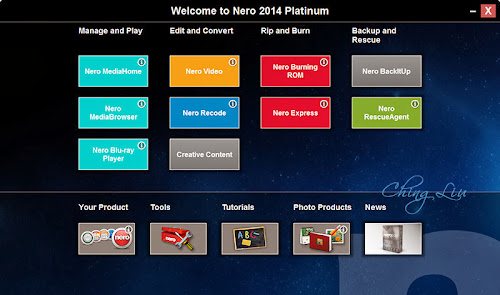
Nero 2014 Platinum 15.0.03400 Final With Content Pack

Nero 2014 Platinum 15 Full Version Free Download With Keygen Crack Licensed File

Nero 2014 Platinum – The Platinum Standard in HD Multimedia Size: 1072MB:
* Manage and create with confidence and ease
* Burn high quality discs and convert virtually any format
* Play it all
NEW! Nero Play to TV streaming:
- NEW! Now stream movies to your TV with 1-click and control them via your TVs remote control right from your couch.
- NEW! The cool new feature Slideshow to TV lets you stream your very own high quality slideshows with one click through Nero MediaHome to your TV including themes, effects and music.
NEW! 1-click Disc to Device conversion1):
- NEW! Effortlessly transcode and send your video or audio disc content to any connected device or virtual drive
- NEW! 1-click transcode and send video or audio disc content to any connected device or virtual drive
- NEW! Now with Nero Disc to Device take video discs and Audio CDs on the go easily.
NEW! Ultra HD (4K) video editing:
- NEW! Ultra HD (4K) video editing for cinema quality videos
- NEW! High quality video filters, transitions and titles with the new format
- NEW! Nero 4K video editing supports trimming, arranging, cropping, rotating, multitrack overlay editing and a sophisticated Picture-in-Picture generator
NEW! Ultimate Mobile Device support:
- Includes ultimate mobile device support for latest and greatest iOS, Android and Windows 8 smartphones and tablets
- Preconfigured profiles for the most popular mobile devices when converting discs
- Optimized encoding performance makes best use of your PCâ?™s hardware
Minimum System Requirements For Nero 2014 Platinum:
- Windows® XP SP3 (32 bit), Windows Vista® SP2 or later (32/64 bit), Windows® 7 SP1 Home Premium, Professional or Ultimate (32/64 bit), Windows® 8 (32/64 bit), Windows® 8.1 (32/64 bit)
- 2 GHz AMD or Intel® processor
- 1 GB RAM
- 5 GB hard drive space for a typical installation of all components (including templates, content and temporary disk space)
- Microsoft® DirectX® 9.0 compliant graphics card
- DVD disc drive for installation and playback
- CD, DVD, or Blu-ray Disc recordable or rewritable drive for burning
- Windows Media® Player 9 or higher
- Third party components such as Microsoft Windows® Installer 4.5, Microsoft .NET® 4, Microsoft® DirectX® or Adobe Flash are shipped with the product or automated download if not included in the package
- For some services an Internet connection is required. Internet connection charges are the user’s responsibility
- Blu-ray Disc Playback, Blu-ray 3D Disc Playback as well as HD Video Editing require Windows Vista® SP2 (32/64 bit), Windows® 7 SP1 Home Premium, Professional or Ultimate (32/64 bit), Windows® 8, (32/64 bit), Windows® 8.1 (32/64 bit)
- Ultra HD (4K) Editing requires 64 bit operating systems: Windows® 7 SP1 Home Premium, Professional or Ultimate, Windows® 8, Windows® 8.1
- For further requirements please check http://www.nero.com/eng/products/nero-platinum/system-requirements.php
Note:
- On 64 bit operating systems, applications run in 32 bit emulation mode
- The devices must be correctly installed and recognized by the operating system for the product to work properly
- Installation of the latest WHQL certified device drivers is strongly recommended
- Setting up of media access server capability requires an PC connected to a local network
Languages: English, French, Spanish, German, Chinese (Simplified), Chinese (Traditional), Japanese, Italian, Turkish, Czech, Korean, Danish, Norwegian, Dutch, Polish, Portuguese (Brazil), Finnish, Russian, Swedish, Greek, Thai, Hungarian

Homepage: http://www.nero.com/eng/products/nero-platinum/whats-new.php
https://app.box.com/s/p8inu0hkavs3xalpm2kq

|Free Download Via Resumable Rar Parts Size: 380MB||
Nowdownload Download Links: part-1 | part-2 | part-3
Multiupload Download Links: part-1 | part-2 | part-3
Sendmyway Download Links: part-1 | part-2 | part-3
Uploadbaz Download Links: part-1 | part-2 | part-3
Albafile Download Links: part-1 | part-2 | part-3
Filedap Download Links: part-1 | part-2 | part-3
Davvas Download Links: part-1 | part-2 | part-3
Hipfile Download Links: part-1 | part-2 | part-3
Direct Download Links: part-1 | part-2 | part-3
Uppit Download Links: part-1 | part-2 | part-3

image

Power ISO 5.7 Full Version For Free


PowerISO is a powerful CD / DVD / BD image file processing tool, which allows you to open, extract, burn, create, edit, compress, encrypt, split and convert ISO files, and mount ISO files with internal virtual drive. It can process almost all CD / DVD / BD image files including ISO and BIN files. PowerISO provides an all-in-one solution. You can do every thing with your ISO files and disc image files.

Features:
  • Support almost all CD / DVD / BD-ROM image file formats (ISO, BIN, NRG, CDI, DAA and so on).
  • What is DAA file? DAA file (Direct-Access-Archive) is an advanced format for image file, which supports some advanced features, such as compression, password protection, and splitting to multiple volumes.
  • Open and extract ISO file. You can extract ISO file with a single click. >>More Detail
  • Burn ISO file to CD, DVD, or Blu-Ray disc. PowerISO is a professional burning software. With this tool, you can create Audio CD, Data CD, Data DVD, Video DVD or VCD. PowerISO also supports Blu-Ray burning.
  • Burn Audio CD from MP3, FLAC, APE, WMA, or BIN files.
  • Rip Audio CD to MP3, FLAC, APE, WMA, or BIN files.
  • Create ISO file or BIN file from hard disk files or CD / DVD / BD discs. 
  • Edit ISO image file directly.
  • Mount ISO file with internal virtual drive. PowerISO can mount all popular disc image files to built-in virtual drive.
  • Convert image files between ISO / BIN and other formats. PowerISO can not only convert BIN to ISO, but also convert almost all image file formats to standard ISO image file.
  • Create bootable USB drive. PowerISO allows you to setup Windows through USB drive. (more details on www.poweriso.com)
  • Make bootable ISO file and create bootable CD, DVD disc.
  • Support both 32-bit and 64-bit Windows.
  • Can be used easily. PowerISO supports shell integration, context menu, drag and drop, clipboard copy paste
image

UltraISO Premium Edition 9 Free Download By Muhammad Saleem

UltraISO Premium Edition can extract, create, edit, and convert CD/DVD image files. It can directly edit an ISO file, make ISO images from CD/DVD-ROMs, create a new ISO from files and folders on your computer, and make bootable CDs and DVDs. In addition, UltraISO can convert nearly all knownCD and DVD image formats to ISO, BIN/CUE, Nero (NRG), Alcohol 120% (MDS/MDF), and CloneCD(CCD/IMG/SUB) formats, as well as burn CD/DVD images directly with built-in burning engine and emulate ISO images with up to 8 virtual CD/DVD drives.
Version 9.3.3.2685 can view and extract files from XBOX360 ISO images, mount UDF DVD images on Windows Vista and Windows 7 Beta 1, and save newly detected media capacity.
What’s new in this version: Can open, view and extract files from XBOX360 ISO images and non copy-protected XBOX360 DVD’s  Supports mounting UDF DVD images on Windows Vista/Windows 7 Beta1 (ISODrive)  Saves newly detected media capacity Improveed performance for editing bootable ISO’s with large boot image file Can detect and use Nero 9 as default burning software Fixed a compatible problem with Ashampoo burning package  Fixed a bug with converting some PlayStation CD images in MDS/MDF format Can open, view and extract files from XBOX360 ISO images and non copy protected XBOX360 DVD’s  Supports mounting UDF DVD images on Windows Vista/Windows 7 Beta1 (ISODrive) Saves newly detected media capacity Improveed performance for editing bootable ISO’s with large boot image file Can detect and use Nero 9 as default burning software Fixed a compatible problem with Ashampoo burning package Fixed a bug with converting some PlayStation CD images in MDS/MDF format Some minor improvements and bug fixes.
Highly versatile and especially proficient with boot discs, UltraISO Premium creates, edits, and burns disc images in several popular formats: ISO, BIN, Nero, Alcohol, CloneCD, and Xbox. It also converts images among formats. UltraISO supports data and audio/video discs and includes a simple MP3 encoder, but it really excels at creating bootable discs. It even can create a disc with a menu for booting several OSs.
The interface is well organized, though rather plain, and we wish its icons were more readable. Also on the negative side, the program can’t mount CD images, which will diminish its value for some. However, if you need support for multiple image formats and want to design bootable discs, UltraISO makes a very good pic

1. Download and Extract with WinRAR2.Install like a default application
3.Copy the serial key and name to the regristration area.
4.Resart it and click help about see it’s pro verion..
Enjoy ;-)